The Fringe
Indirect Rate

How Fringe Benefits Are Pooled, Allocated, and Applied to All Labor Under FAR 31.205-6 and CAS 418
Total Labor
Allocation Base
FAR 31.205-6
Cost Principle
CAS 418
Allocation Standard
01 — Fundamentals
What Is the Fringe Rate?
The fringe rate captures the cost of employee benefits — payroll taxes, health insurance, retirement contributions, and paid time off — and spreads that cost across every hour of labor the company incurs. It is typically the first tier in a three-tier indirect rate structure and is applied before overhead and G&A.

Cost of Employing People

Fringe captures the real cost of compensating employees beyond base wages: payroll taxes, insurance, retirement, and paid leave. These costs are pooled and allocated to every labor dollar per FAR 31.205-6.

FAR 31.205-6 & CAS 418

FAR 31.205-6 governs compensation allowability. CAS 418 requires that the fringe allocation base represent the labor activity that causes the benefit cost.

📈

Applied First

Fringe is the foundational rate, applied before overhead and G&A. Applied fringe then becomes part of the overhead pool (if bundled) or overhead base (if separate), making fringe a critical input to every downstream rate.

💰

Allocated to All Labor

Unlike overhead (direct labor base) or G&A (TCI base), fringe is allocated to all labor — direct, indirect, IR&D/B&P, and unallowable. Every hour of labor carries its proportionate share of benefits cost.

The Fringe Schedule

When fringe is a separate rate, the ICP Dashboard generates a dedicated Fringe Schedule — a standalone pool/base/rate page — alongside Schedules C (overhead) and B (G&A). The rate feeds directly into Schedule A.

🔍

Most Stable Rate

Because benefit costs scale almost perfectly with labor dollars, fringe is typically the most stable of the three indirect rates — often varying by less than a percentage point year over year unless benefit programs change materially.

02 — Pipeline
Fringe Rate Computation Flow
The fringe rate is the ratio of the fringe pool to the total labor allocation base. The pool captures every benefit-related account; the base captures every labor dollar the company paid during the fiscal year.
📄

Fringe Pool

Benefit expense accounts
(FICA, health, 401k, PTO)
= Pool (numerator)

÷
📊

Labor Base

Direct + indirect labor
+ IR&D/B&P labor
(denominator)

=
💼

Fringe Rate

Expressed as %
rounded to 4 decimals
(e.g., 34.2500%)

📝

Applied to Labor

Every labor dollar
carries fringe — direct,
indirect, IR&D/B&P

📄
Pool = All Benefits

Payroll taxes, health and dental insurance, life and disability, 401(k) match, PTO, holiday, sick leave, and workers' comp. Unallowable portions per FAR 31.205-6 are removed via adjustments.

📈
Base = Total Labor

Every labor dollar the company paid — not just direct labor. Because benefits accrue to all employees, the base must include indirect labor, IR&D/B&P labor, and even unallowable labor to keep the allocation causal and beneficial.

💼
Rate = Pool / Base

The fringe rate is typically 25–45% for professional services contractors and 35–60% for firms with rich benefit packages. It is computed to 4 decimals and appears on Schedule A as the first tier of the indirect rate stack.

03 — Fringe Schedule
The Fringe Cost Pool
The fringe pool captures every benefit-related account in the general ledger. Unlike overhead or G&A, the pool is tightly scoped — it contains only costs that vary with headcount or hours worked.

What Goes Into the Fringe Pool

Fringe accounts are easy to identify because they all share one characteristic: the cost is driven by labor, not by contract activity or company-wide management. The pool is built from payroll tax accounts, insurance accounts, retirement accounts, and paid-leave accounts.

  • Payroll Taxes — Employer-paid FICA, Medicare, FUTA, and SUTA. These are mandatory and scale directly with gross wages.
  • Health & Dental Insurance — Employer premium contributions for medical, dental, and vision coverage. Typically the largest component of the pool.
  • Life & Disability Insurance — Employer-paid group life, short-term disability, and long-term disability premiums.
  • Retirement Contributions — 401(k) employer match, profit-sharing, pension contributions. Must comply with FAR 31.205-6(j) deferred compensation rules.
  • Paid Leave — PTO, holiday pay, sick leave, jury duty, and bereavement. Treated as fringe because the cost is incurred without corresponding direct work.
  • Workers' Compensation — Premium costs for workers' comp insurance, typically allocated on a labor-dollar base.
  • Adjustments — Unallowable compensation elements (excessive executive pay above the FAR 31.205-6(p) cap, certain bonuses, golden parachutes) are removed via adjustments.

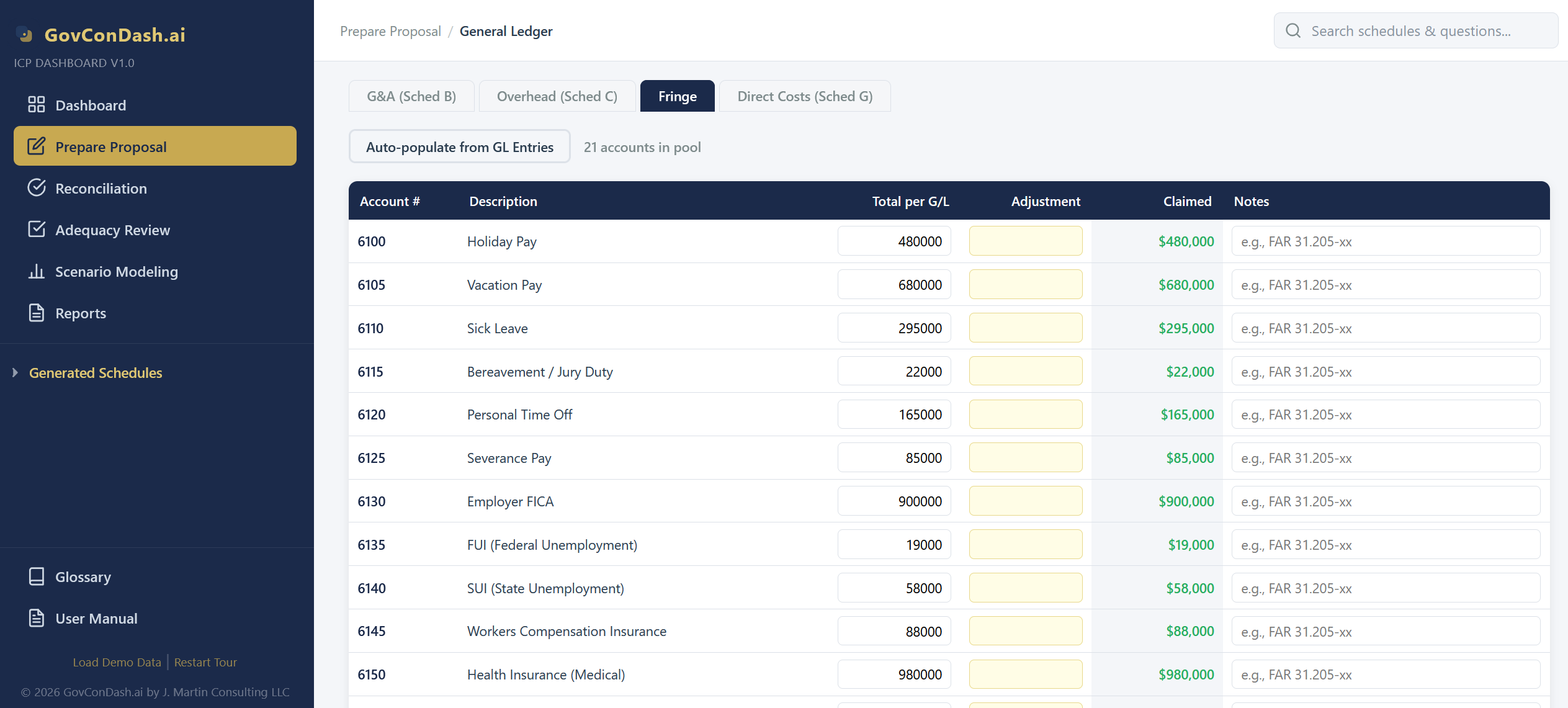
Fringe schedule
Fringe Schedule: Benefit expense accounts, adjustments, and claimed pool total
04 — Allocation Base
The Fringe Allocation Base
Per CAS 418, the allocation base must represent the activity that causes or generates the pool costs. Because benefits accrue to every employee who draws a paycheck, the fringe base is total company labor — not just direct labor.

How the Fringe Base Is Built

The fringe base captures every labor dollar the company paid during the fiscal year. It is assembled by summing labor across every Schedule H contract section, plus all indirect labor pools, plus IR&D/B&P labor.

  • Direct Contract Labor — Labor charged to cost-type, T&M, fixed-price, and commercial contracts on Schedule H sections A through E.
  • Indirect Labor — Supervisors, project managers, QA staff, and other indirect personnel whose labor sits in the overhead or G&A pools.
  • IR&D/B&P Labor — Independent research, development, and proposal labor receives fringe the same way billable labor does.
  • Unallowable Labor — Per CAS 418, unallowable labor stays in the base — removing it would shift fringe burden to allowable work and distort the allocation.
  • Paid Leave in the Base — Different firms take different approaches. Some firms treat PTO dollars as pool costs and exclude PTO hours from the base; others keep both in. Consistency year-over-year is what matters for CAS 401.
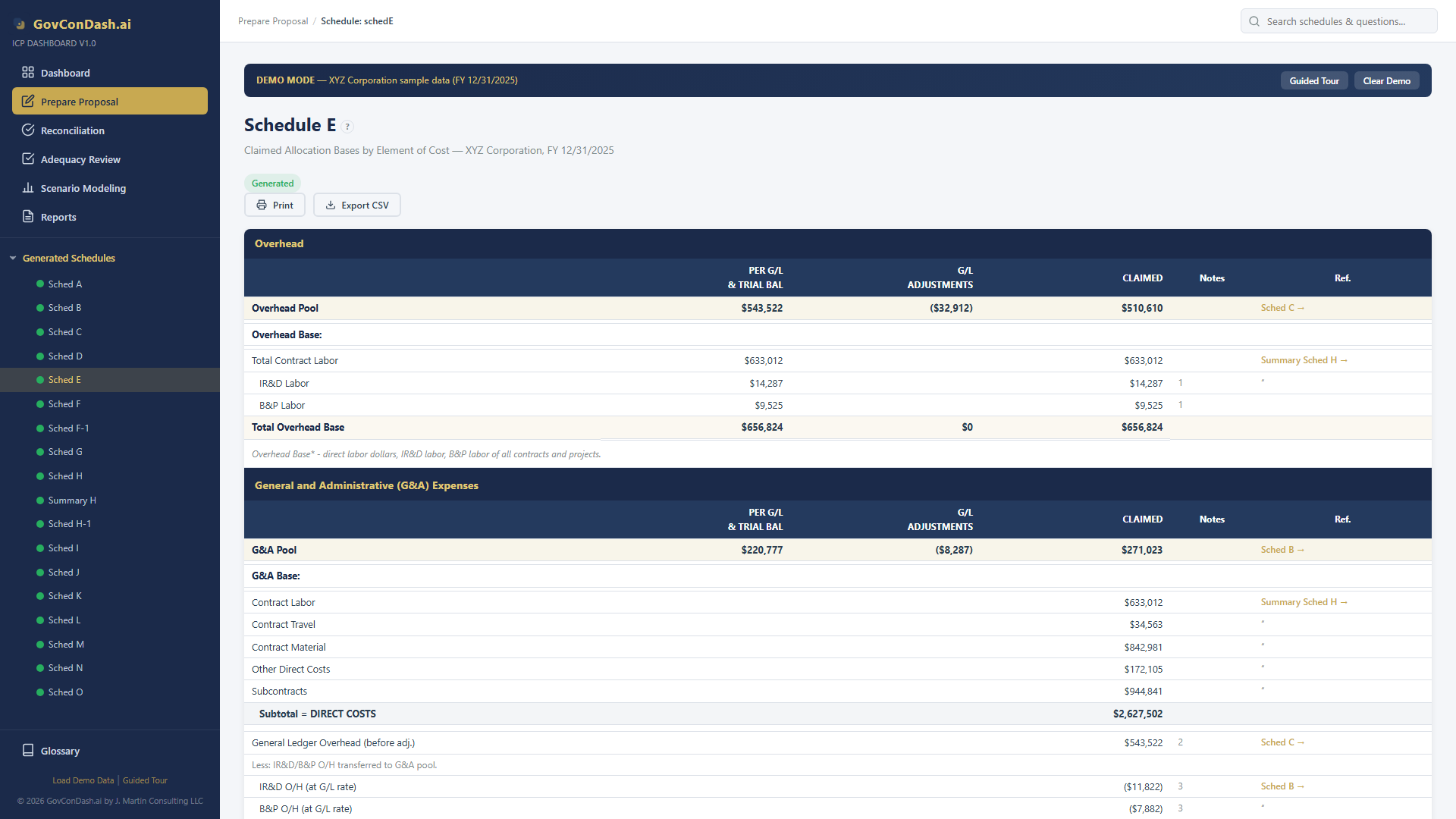
Schedule E allocation bases
Schedule E: Allocation bases including labor components used as the fringe denominator
05 — Formulas
Fringe Rate Formulas
The core fringe computation is pool divided by labor base. But how fringe flows into downstream rates — and whether it is a separate rate or bundled into overhead — creates several formula variations.
Fringe Rate = Pool / Total Labor

Core Rate Formula

The fringe pool (sum of benefit expense accounts) divided by the total labor base (all direct, indirect, IR&D/B&P labor), rounded to 4 decimal places and expressed as a percentage.

4-Decimal Precision
Base = DL + Indirect + IRDBP

Total Labor Base

Direct labor from Schedule H sections A–E, plus all indirect labor in overhead and G&A pools, plus IR&D/B&P labor. Every paid labor dollar belongs in the base.

Causal-Beneficial
Applied Fringe = Labor × Rate

Application to Any Labor

For any labor dollar — contract, indirect, or IR&D/B&P — the applied fringe is labor multiplied by the fringe rate. Result flows into the corresponding pool or contract schedule.

Universal Application
OH Pool += Fringe on Indirect Labor

Fringe on Indirect Labor

Applied fringe on indirect labor flows into the overhead pool. Applied fringe on G&A labor flows into the G&A pool. This is how benefits cascade through the indirect rate structure.

Cascading Flow
OH Pool += All Fringe (bundled)

Two-Tier: Fringe in Overhead

When fringe is not a separate rate, the entire fringe pool is absorbed into the overhead pool on Schedule C, producing a single blended overhead rate. The fringe schedule is not generated.

Two-Tier Option
Wrap = (1 + F)(1 + OH)(1 + GA)

Wrap Rate Impact

In a three-tier structure, fringe is the first multiplier in the wrap rate formula. A 34.25% fringe rate means every $1 of direct labor becomes $1.3425 before overhead is applied.

First Multiplier
06 — Configuration
Separate Rate vs In OH Base
The most consequential fringe decision is whether to report fringe as its own indirect rate or to embed fringe in the OH allocation base. Both are acceptable under CAS 418, but the choice must be consistent with the disclosure statement and must be applied the same way every year.

Choosing Your Fringe Configuration

The dashboard supports both configurations via the fringeAsSeparateRate and fringeInOHBase setup flags. Each has clear tradeoffs in transparency, simplicity, and rate levels.

  • Separate Rate — Fringe stands alone on Schedule A. Transparent to auditors, who can see exactly what the benefit load is. Required when fringe varies materially across labor categories.
  • Fringe in OH Base — Fringe on direct labor is added to the OH base denominator. This lowers the OH rate (bigger denominator) but also lowers the rate applied to bare labor dollars.
  • Fringe Absorbed in OH Pool — When fringe is not a separate rate, fringe expenses are rolled into the OH pool itself. The OH rate effectively loads labor with both pure overhead and benefits in one pass.
  • Consistency Rule — Once chosen, the configuration must match the contractor's disclosure statement and must be applied the same way every fiscal year per CAS 401.
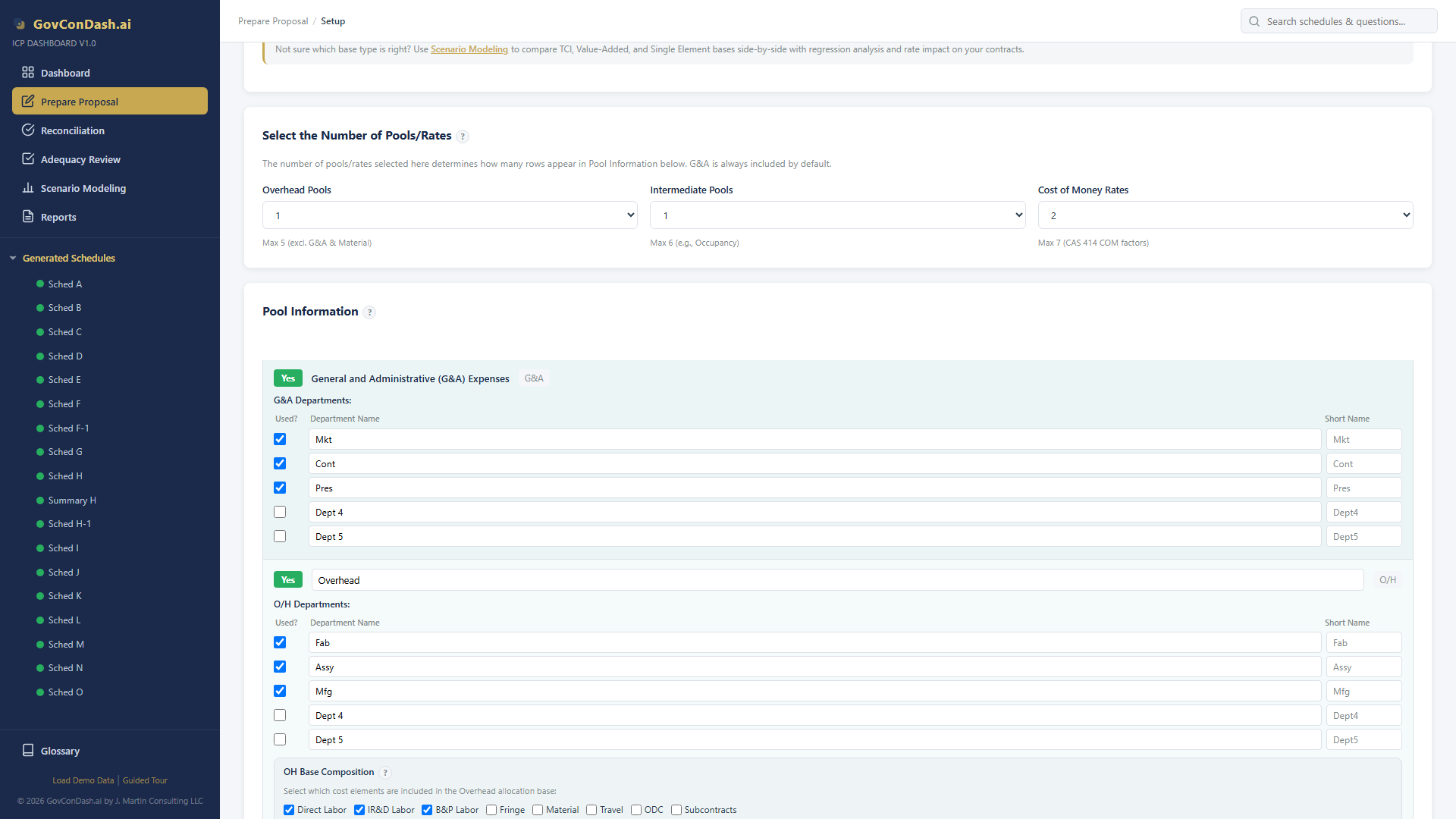
Setup fringe configuration
Setup: Fringe configuration — separate rate vs. in OH base, pool count, and base options
07 — Scenario Modeling
What-If Analysis for Fringe Rates
Because fringe is the first multiplier in the wrap rate, even small changes to the fringe rate cascade through overhead and G&A. The ICP Dashboard's scenario modeling suite lets you simulate benefit-cost changes and see the impact on every downstream rate.

Fringe Rate What-If Scenarios

Benefit costs change every year — health insurance renewals, 401(k) match changes, new PTO policies. Scenario modeling quantifies the impact before it hits your rates.

  • Benefit Cost Adjustments — Model a 10% health insurance increase, a 401(k) match change, or a new parental leave policy. See the fringe rate delta and the downstream wrap rate impact.
  • Headcount Shifts — Model adding 15 engineers or shifting 10 admin staff to direct-bill roles. See how labor base composition changes affect the fringe rate.
  • Target Rate Calculator — Set a target fringe rate (e.g., for competitive pricing) and reverse-solve for the pool reduction or base expansion needed to hit it.
  • PTO Policy Changes — Model adding a week of PTO. See how the pool grows, how the base grows (if PTO dollars stay in base), and the net rate impact.
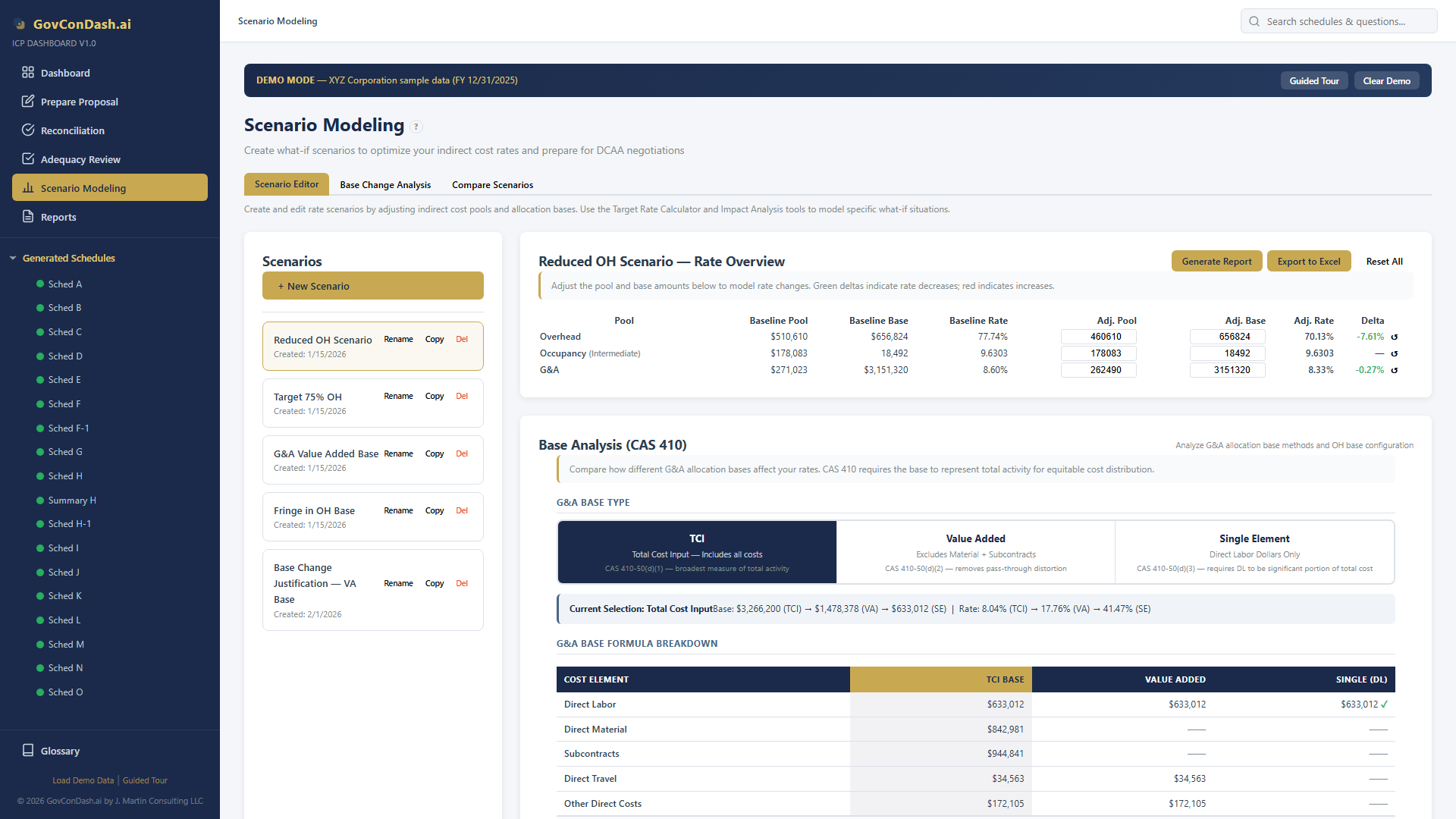
Scenario editor
Scenario editor with fringe pool adjustments, base configuration, and rate delta highlighting

Cascading Rate Effects

Fringe sits at the bottom of the wrap rate stack. A one-point fringe change compounds through overhead and G&A, producing outsized wrap rate effects. Scenario modeling makes these compounding effects visible.

  • Fringe ➞ Overhead Pool — Applied fringe on indirect labor increases the overhead pool. A higher fringe rate raises the overhead pool, which raises the overhead rate.
  • Fringe ➞ G&A Pool — Applied fringe on G&A labor increases the G&A pool. A higher fringe rate raises G&A as well.
  • Fringe ➞ Wrap Rate — Wrap = (1+F)(1+OH)(1+G&A). A one-point fringe change affects the first multiplier, producing compounding changes to the wrap rate used in proposals.
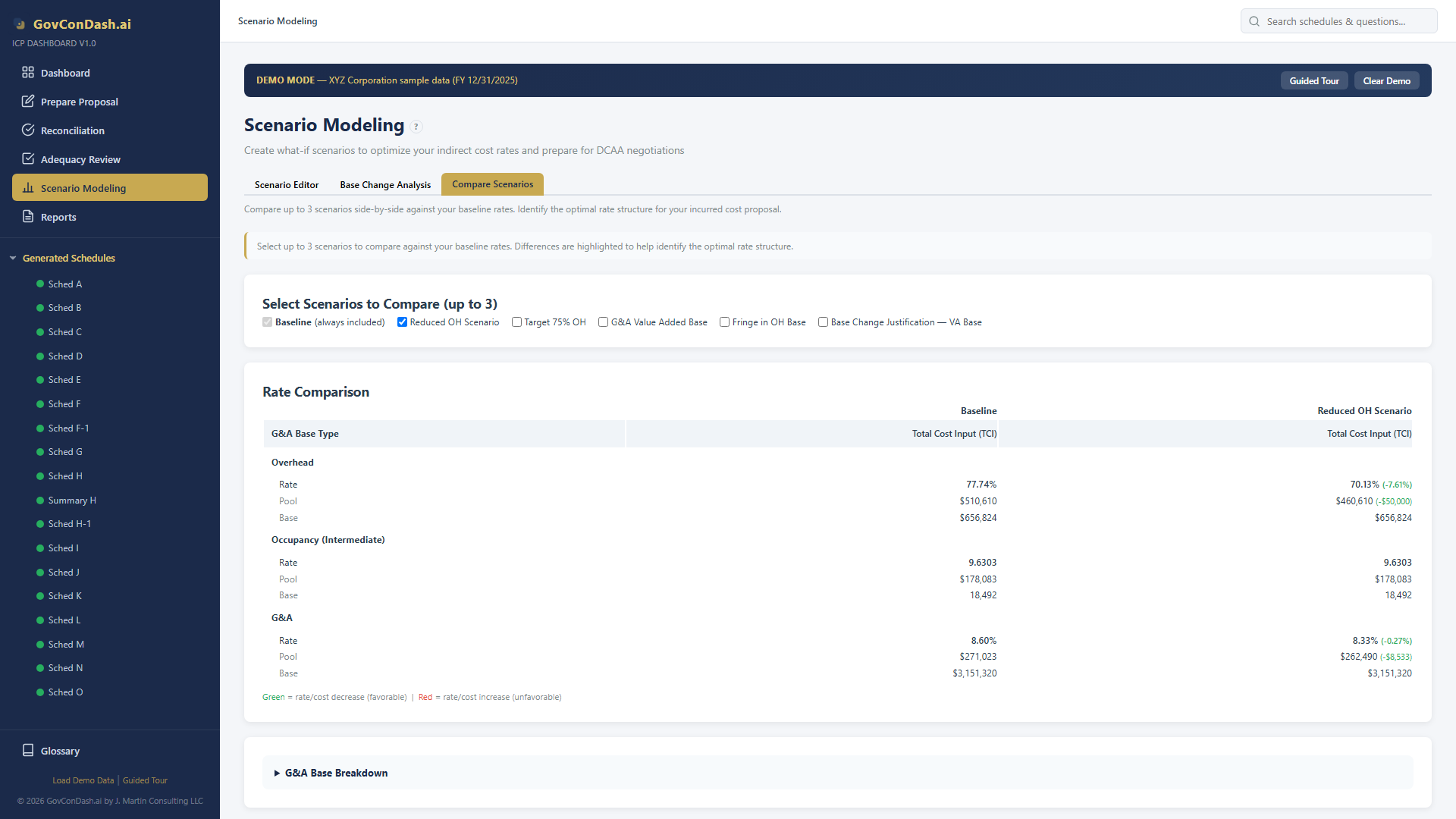
  • Comparison View — Select up to 3 scenarios and compare fringe, overhead, G&A, and wrap rates side by side with delta highlighting for every contract on Schedule H.
Scenario comparison
Side-by-side comparison showing how fringe rate changes cascade through overhead and G&A
08 — Validation & Reconciliation
Verifying Your Fringe Schedule
Before submitting your ICP, the fringe schedule must pass cross-schedule math checks, unallowable compensation scans, completeness audits, and the relevant DCAA Adequacy Checklist questions. The dashboard automates all of this.

Cross-Schedule Math Consistency

The dashboard automatically verifies that the Fringe Schedule pool, labor base, and rate on Schedule A are internally consistent. Any variance greater than $1 is flagged as an error.

  • Pool ÷ Base = Rate — The fringe pool total divided by the total labor base must equal the fringe rate on Schedule A within $1 tolerance.
  • Base-to-Schedule-H Tie — The labor dollars in the fringe base must reconcile to the sum of labor in Schedule H sections plus indirect labor pools plus IR&D/B&P labor.
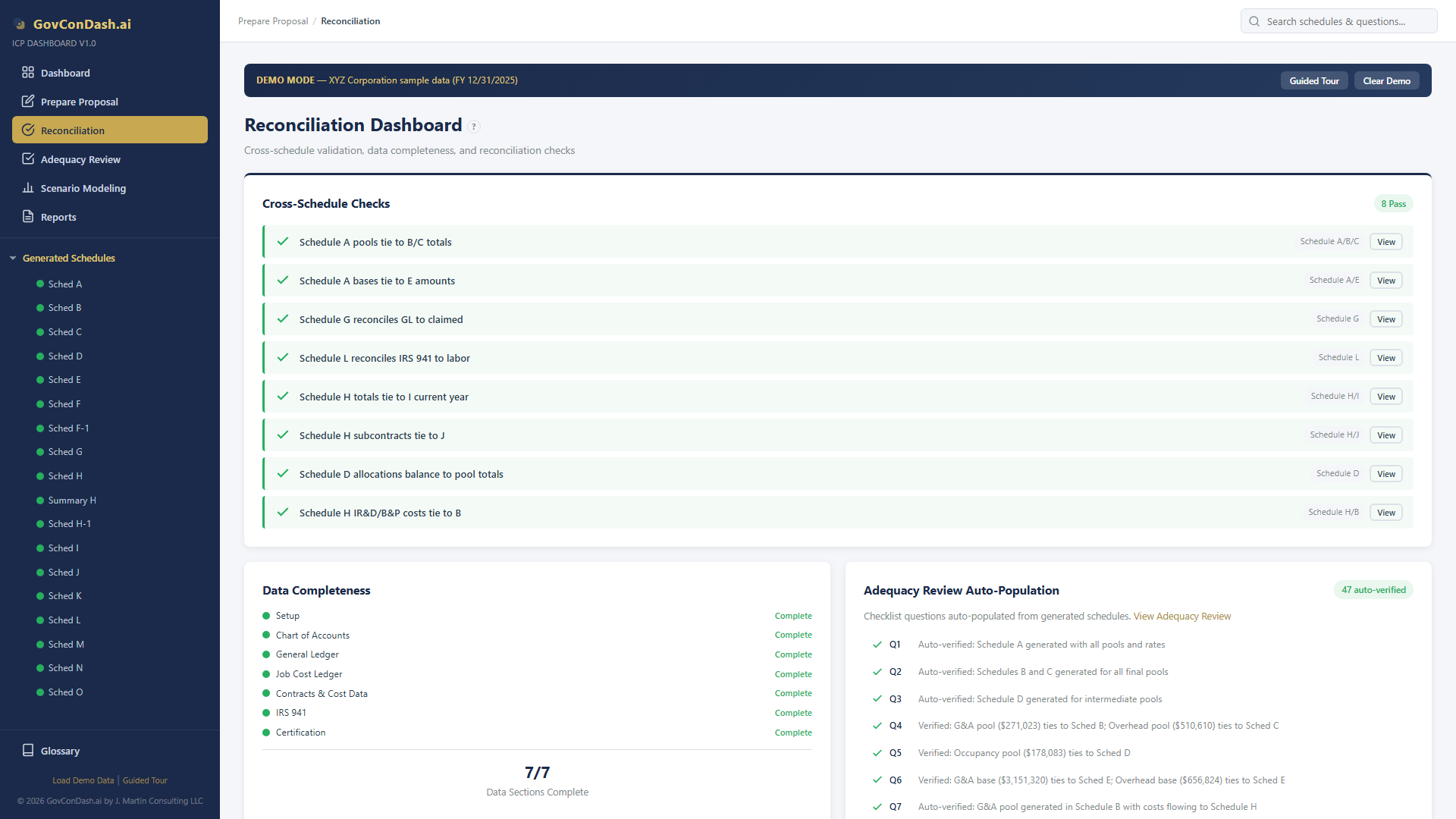
  • Automatic on Generation — These checks run every time you generate schedules. Results appear on the Reconciliation page with pass/fail status for each check.
Cross-schedule reconciliation checks
Cross-schedule checks verifying Fringe Pool ÷ Base = Schedule A rate

Smart Validation — Compensation Checks

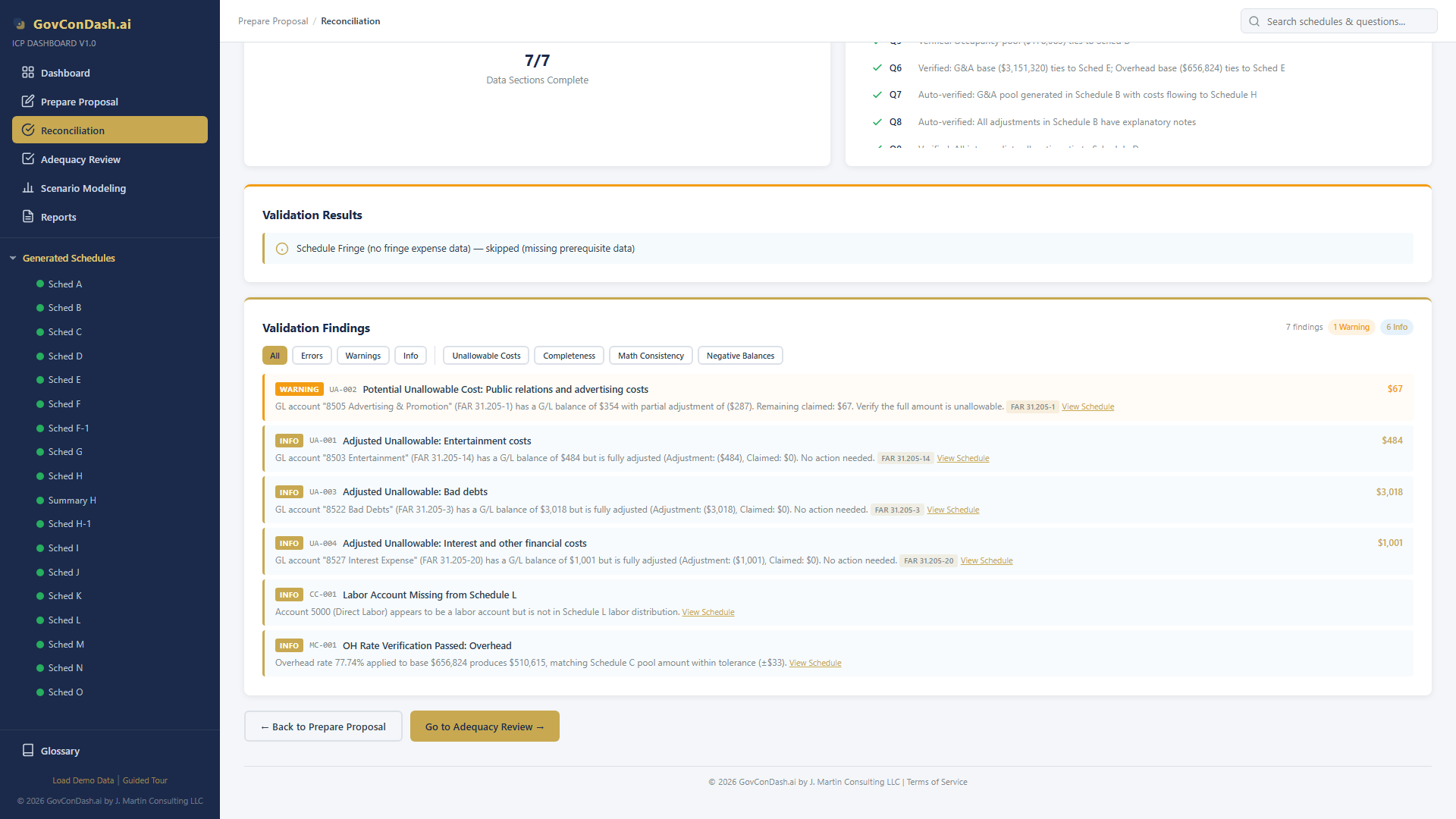
The Smart Validation Engine scans fringe accounts against FAR 31.205-6 compensation rules and related cost principles. It flags unallowable compensation, checks completeness, and catches mispostings.

  • Executive Compensation CapFAR 31.205-6(p) caps allowable executive compensation. Accounts with excessive executive pay are flagged for adjustment.
  • Golden Parachutes & Severance — Certain severance and golden-parachute payments are unallowable per FAR 31.205-6(g). Accounts named "severance," "golden parachute," etc. are flagged.
  • Deferred CompensationFAR 31.205-6(k) governs deferred compensation allowability. Accrued but unfunded deferred comp is flagged.
  • Completeness — Detects fringe accounts that are not mapped to the fringe pool, benefit accounts with zero activity, and GL accounts that appear to be benefits but are miscategorized.
Smart validation findings
Smart Validation findings for fringe accounts with FAR 31.205-6 references and severity levels

DCAA Adequacy Checklist

The dashboard includes the 47-question DCAA Adequacy Checklist (v3.4). Several questions specifically address the fringe schedule. Reconciliation results can auto-populate checklist answers.

  • Fringe Pool Questions — Is the fringe pool properly scoped? Are unallowable compensation elements adjusted? Does the pool reconcile to the general ledger and to the payroll register?
  • Fringe Base Questions — Is the base consistent with the disclosed practice? Does it include all labor (direct, indirect, IR&D/B&P, unallowable) per CAS 418?
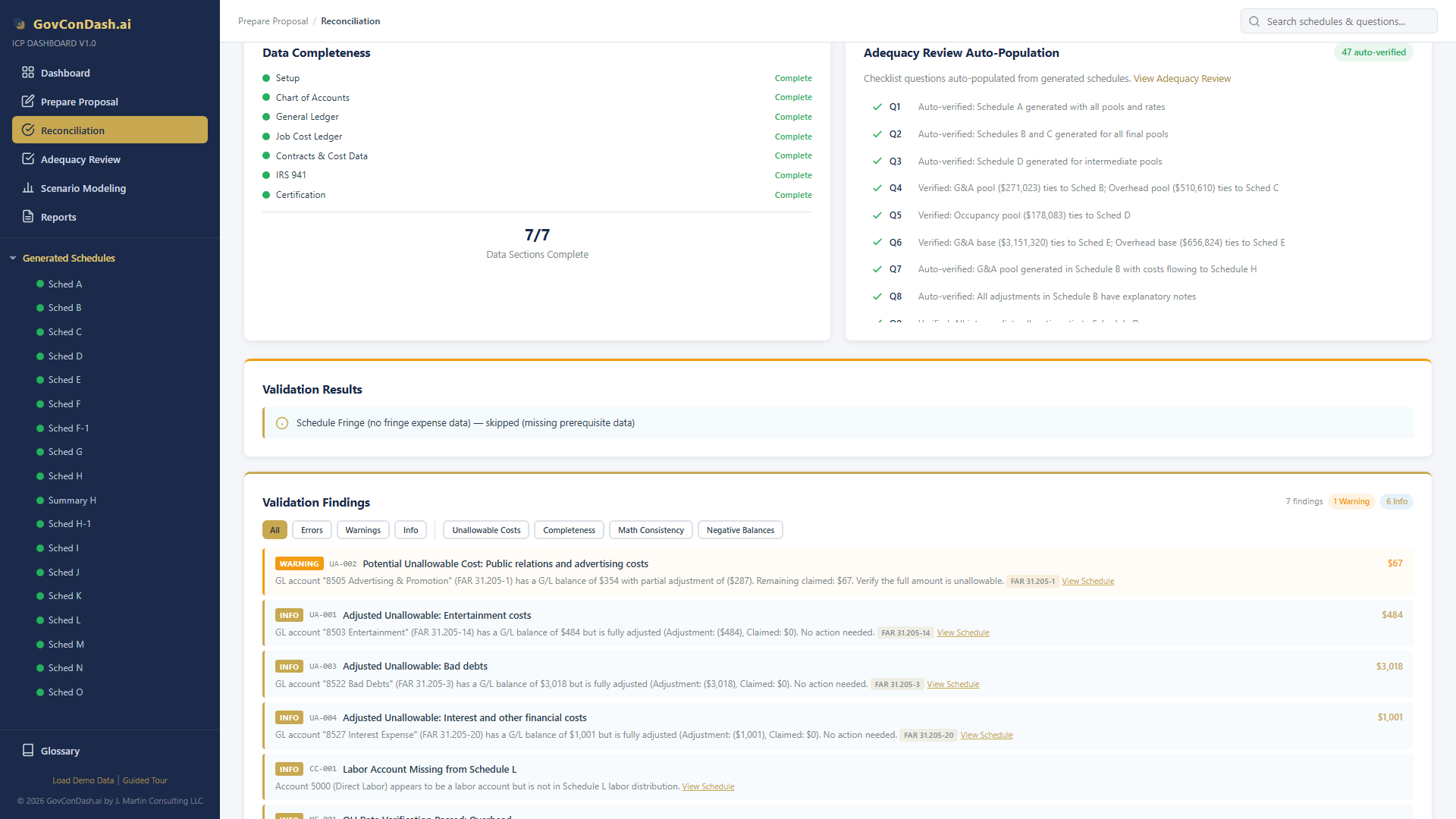
  • Auto-Population — When reconciliation checks pass, the dashboard auto-marks corresponding adequacy questions as "Received: Y, Adequate: Y" with supporting comments — documentation the auditor can verify.
  • Exportable Report — The full 47-question assessment exports to Excel with all answers, comments, and summary statistics for submission alongside the ICP.
Adequacy auto-populate
Adequacy checklist auto-populated from fringe reconciliation and validation results
09 — Common Mistakes
Fringe Rate Pitfalls
Fringe rates receive close DCAA scrutiny because benefit costs tie directly to executive-compensation and unallowable-cost rules. These common mistakes lead to questioned costs, rate adjustments, and adequacy failures.

Excluding Indirect Labor From the Base

The fringe base must include all labor — direct, indirect, IR&D/B&P, and unallowable. Excluding indirect or unallowable labor overstates the fringe rate and violates CAS 418 causal-beneficial requirements.

Executive Compensation Over the Cap

FAR 31.205-6(p) caps allowable executive compensation (currently $645,646 for 2024). Amounts above the cap must be removed from the pool via adjustment or they will be disallowed during audit.

Golden Parachutes & Severance

Certain severance and golden-parachute payments are unallowable per FAR 31.205-6(g). Leaving these in the fringe pool inflates the rate and creates questioned costs.

Unfunded Deferred Compensation

Accrued but unfunded deferred compensation is unallowable per FAR 31.205-6(k). Only funded amounts are claimable in the current fiscal year's fringe pool.

Inconsistent Treatment Year Over Year

Changing fringe structure (composite vs segregated, PTO in base vs out) between fiscal years without a disclosure statement change violates CAS 401 consistency requirements.

Missing Pool-to-Payroll Reconciliation

The fringe pool must reconcile to the payroll register and to the general ledger. DCAA will reject submissions where the fringe pool does not tie to the payroll system.

Bonus Allowability Errors

Bonuses are allowable only if established by written policy or contract before performance and applied consistently. Ad-hoc bonuses or bonuses tied to government-contract performance incentives are unallowable per FAR 31.205-6(f).

Using Composite When Segregated Is Required

When benefit programs differ materially by employee class (exempt vs non-exempt, onshore vs offshore), a single composite rate cross-subsidizes and can trigger CAS 418 homogeneity findings.

Master Your Fringe Rate

The ICP Dashboard automates fringe pool accumulation, labor base computation, rate calculation, composite-vs-segregated structures, and cross-schedule reconciliation — with built-in what-if scenario modeling and FAR 31.205-6 compensation checks.

IncurredCostProposal.com